A practical look at MT4 for forex traders
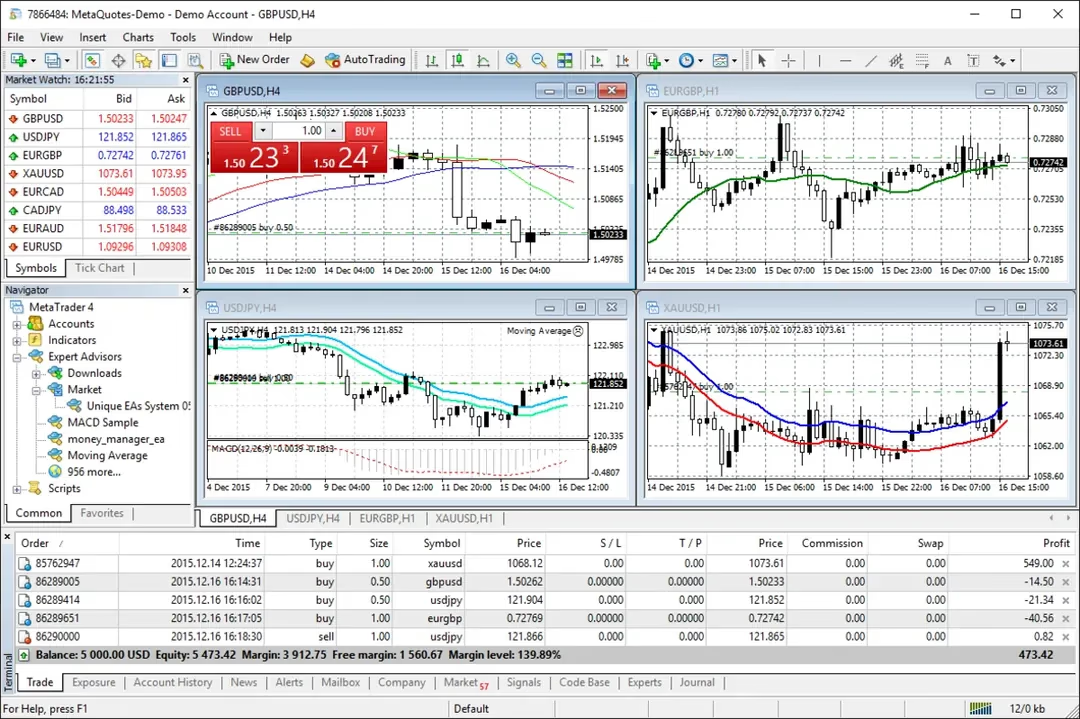
Why traders still pick MT4 over newer platforms
MetaQuotes stopped issuing new MT4 licences a while back, nudging brokers toward MT5. Still, most retail forex traders haven't moved. The reason is not complicated: MT4 does one thing well. More than a decade's worth of custom indicators, Expert Advisors, and community scripts only work with MT4. Moving to MT5 means rewriting that entire library, and few people would additional information rather keep trading than recoding.
I spent time testing both platforms side by side, and the differences are smaller than you'd expect. MT5 has a few extras including more timeframes and a built-in economic calendar, but chart functionality feels nearly identical. For most retail strategies, MT4 still holds its own.
Setting up MT4 without the usual headaches
The install process is quick. Where people waste time is configuration. By default, MT4 loads with four charts tiled across the screen. Clear the lot and start fresh with the instruments you care about.
Chart templates save time. Build your usual indicators on one chart, then right-click and save as template. Then you can load it onto other charts instantly. Minor detail, but over months it makes a difference.
A quick tweak that helps: open Tools > Options > Charts and enable "Show ask line." The default view is the bid price on the chart, which can make entries appear wrong until you realise the ask price is hidden.
MT4 strategy tester: honest expectations
The strategy tester in MT4 gives you the ability to run Expert Advisors against historical data. That said: the quality of those results depends entirely on your tick data. The default history data from MetaQuotes is not real tick data, meaning gaps between real data points are estimated using algorithms. For anything that needs accuracy, download proper historical data.
That quality percentage in the results tells you more than the headline profit number. Anything below 90% suggests the results shouldn't be taken seriously. Traders sometimes share screenshots with 25% modelling quality and wonder why their live results don't match.
The strategy tester is one of MT4's stronger features, but only if you feed it decent data.
Custom indicators on MT4: worth the effort?
MT4 comes with 30 default technical indicators. The average trader uses maybe a handful. But the real depth is in custom indicators written in MQL4. You can find a massive library, covering everything from simple moving average variations to complex multi-timeframe dashboards.
Installing them is straightforward: copy the .ex4 or .mq4 file into the MQL4/Indicators folder, refresh MT4, and it appears in the Navigator panel. The risk is quality control. Community indicators vary wildly. A few are well coded and maintained. Some stopped working years ago and can freeze your terminal.
If you're downloading custom indicators, check how recently it was maintained and whether other traders mention bugs. A broken indicator doesn't only show wrong data — it can freeze the whole terminal.
Risk management settings most MT4 traders ignore
MT4 has several built-in risk management options that most traders don't bother with. First worth mentioning is maximum deviation in the trade execution window. This defines the amount of slippage you'll accept on market orders. Without this configured and you'll get whatever price is available.
Stop losses are obvious, but trailing stops is underused. Right-click an open trade, pick Trailing Stop, and enter your preferred distance. The stop follows automatically as price moves into profit. It won't suit every approach, but for trend-following it reduces the need to stare at the screen.
These settings take a minute to configure and they take some of the guesswork out of trade management.
Running Expert Advisors: practical expectations
Expert Advisors on MT4 attract traders for obvious reasons: program your strategy and stop staring at charts. In practice, a huge percentage of them lose money over any meaningful time period. Those advertised with perfect backtest curves tend to be fitted to past data — they worked on historical data and break down the moment market conditions change.
That doesn't mean all EAs are worthless. A few people code personal EAs to handle one particular setup: time-based entries, calculating lot sizes, or taking profit at fixed levels. These smaller, focused scripts work because they execute repetitive actions where you don't need interpretation.
When looking at Expert Advisors, use a demo account for at least several weeks in different conditions. Live demo testing reveals more than historical results ever will.
MT4 beyond the desktop
The platform was designed for Windows. Running it on Mac deal with friction. The traditional approach was running it through Wine, which mostly worked but came with display glitches and occasional crashes. Some brokers now offer native Mac apps built on compatibility layers, which is an improvement but still aren't built from scratch for Mac.
MT4 mobile, on both iPhone and Android, are genuinely useful for keeping an eye on positions and tweaking stops. Doing proper analysis on a mobile device is pushing it, but closing a trade from your phone is genuinely handy.
Check whether your broker offers a proper macOS version or just Wine under the hood — the difference in stability is noticeable.